CookieConsent - stocheaza consimtamantul de acceptare a cookie-urilor.
Necessary-dgs - stocheaza preferintele de limba, acceptarea politicilor, informatii si preferinte formulare.
Cookie-urile necesare sustin buna functionare a site-ului punand la dispozitie functionalitati necesare precum navigarea in site, accesul la functionalitati securizate sau preferinte ale utilizatorului. Cookie-urile necesare nu pot fi deazctivate, intrucat website-ul nu poate functiona in absenta lor.
Sesiune
1 an
Allowed (Mandatory)
Analisys cookies
_ga
_ga_J7JQRC5SNR
_hjSession_3714960
_hjSessionUser_3714960
Cookie-urile de analiza ne ajuta sa intelegem cum interactioneaza vizitatorii cu webiste-ul si colecteaza informatii legate de trafic in mod anomim.
1 an
1 an
Sesiune
1 an
OFF
Functional cookies
Acest site nu utilizeaza cookies functionale.
Acest site nu utilizeaza cookies functionale.
N/A
OFF
Marketing cookies
IDE - utilizat de catre Google Double Click
NID utilizat de catre Google pentru a identifica in mod unic dispozitivul unui utilizator
pagead/1p-user-list/# utilizat de Google
r/collect utilizat de catre Google Double Click
test_cookie utilizat de catre Google pentru a verifica daca browser-ul suporta cookies.
Cookie-urile de marketing sunt cookie-uri ale unor servicii terte. Unele dintre aceste parti folosesc propriile cookie-uri anonime pentru a analiza cat de multe persoane au fost expuse unui mesaj publicitar, sau pentru a vedea cate persoane au fost expuse de mai multe ori la aceeasi reclama. Companiile care genereaza aceste cookie-uri au propriile politici de confidentialitate, iar acest site nu are acces pentru a citi sau scrie aceste cookie-uri. Cookie-urile acelor terte parti pot fi folosite pentru a va arata publicitatea personalizata si pe alte site-uri, bazandu-se pe navigarea dvs. pe acest site.
How do I export the Digital Certificate with the ".cer" extension to submit Form 150 to ANAF?
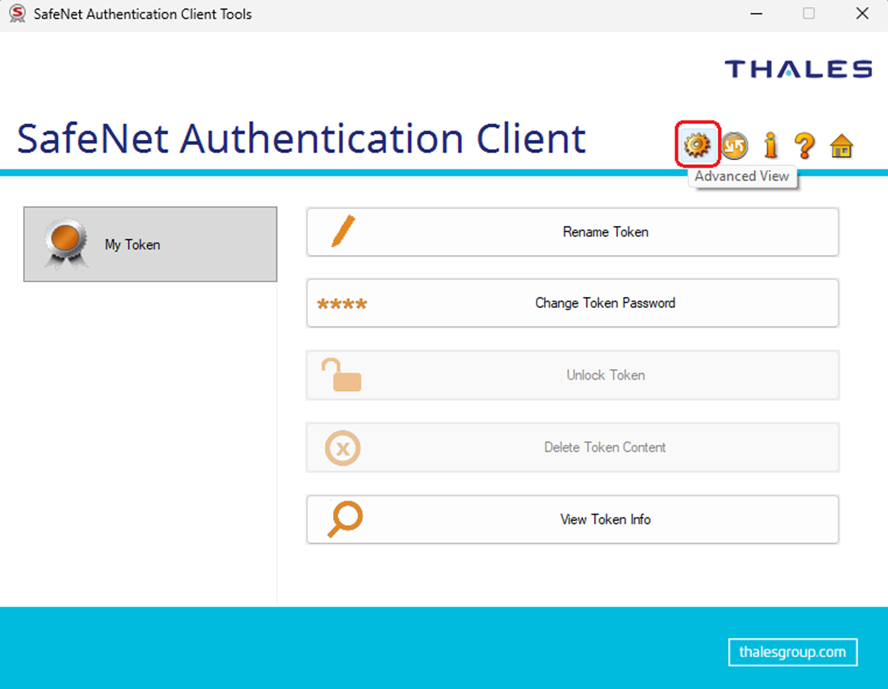
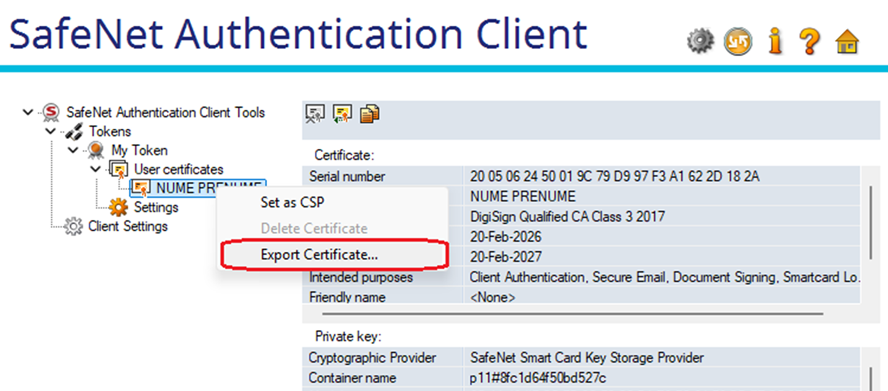
Option 1: You can export the Digital Certificate in ".cer" format from the app - Safenet Authentication Client Tools -> Advanced View -> User Certificates -> right click on your name -> Export Certificate.
Option 2: From the website: www.digisign.ro -> Support -> Registry -> Certificate Check, where you identify the Active certificate and download the CER file